
• Latest
  • All
  • How To
ad-blocker

How to Block Ads with Google Chrome’s Inbuilt Ad Blocker

March 26, 2018
Tangle Is What Happens When Texting Meets a Phone Call

Tangle Is What Happens When Texting Meets a Phone Call

September 4, 2026
ChatGPT, Grok, and Claude

ChatGPT, Claude and Grok All Went Down on the Same Day

September 4, 2026
BAKE Condemns Abduction of Standard Group Editor Alex Kiprotich

BAKE Condemns Abduction of Standard Group Editor Alex Kiprotich

September 3, 2026
X (Twitter)

X Is Fighting an AI Bot Problem, but Real Users Are Getting Caught Too

September 3, 2026
DHgate Tablet Cases deals
Women in STEM Africa Summit 2026 Opens in Nairobi With Call for Investment

Women in STEM Africa Summit 2026 Opens in Nairobi With Call for Investment

September 3, 2026
Uber

Uber Cuts 10% of Its Workforce as It Exits Two African Markets

September 3, 2026
KRA Consolidated Cargo Directive

Ruto Orders KRA to Reverse Consolidated Cargo Benchmark to KES 2.5 Million

September 3, 2026
An Uber Chap-Chap in Kenya

Kenya High Court Blocks 18% Commission Cap for Uber and Bolt

September 3, 2026
Uber Shuts Down Nigeria and Uganda Operations

Uber Shuts Down Nigeria and Uganda Operations

September 3, 2026
Kenyan E-Invoicing Company DigiTax Sets Up UAE Operations

Kenyan Firm DigiTax Launches in UAE, Targets 10 More Markets by 2026

September 2, 2026
DStv Is Planning to Launch a KES 3,000 Standalone Sports Package

DStv Is Planning to Launch a KES 3,000 Standalone Sports Package

September 2, 2026
Chinese Nationals in Custody Over SIM-Swap Fraud; Over KSh 1.1 Million Cash Recovered

Four Chinese Nationals in Custody Over SIM-Swap Fraud as DCI Seizes KES 1.1M Cash

September 2, 2026
Techweez | Tech News, Reviews, Deals, Tips and How To
  • News
  • Entertainment
  • Reviews
  • Features
  • Editorial
No Result
View All Result
Techweez | Tech News, Reviews, Deals, Tips and How To
  • News
  • Entertainment
  • Reviews
  • Features
  • Editorial
No Result
View All Result
Techweez | Tech News, Reviews, Deals, Tips and How To
No Result
View All Result

How to Block Ads with Google Chrome’s Inbuilt Ad Blocker

Saruni Maina by Saruni Maina
March 26, 2018
in Entertainment
Reading Time: 2 mins read
260
7
ad-blocker

ad-blockerWhen it comes to the user experience on the web, things can turn out pretty ugly and a simple task such as downloading a file can turn out to be a frustrating exercise. This is thanks to unethical content creators and websites that have gone the extra mile to ensure they can squeeze every bit of shilling from you when you view their content through pop-up ads, auto-playing videos and other forms of annoying ads.

If you didn’t know, most content creators earn through ads and sponsored content, hence why most blogs will have an ad or two. This is the main reason that the use of ad blockers has been discouraged the world over. However, due to things seemingly getting out of hand, Google decided to take matters into their own hands and create their own ad blocker and bake it into their browser, Chrome. I know, the irony did not pass us by, Google, an ads company creating an ad blocker, but it happened.
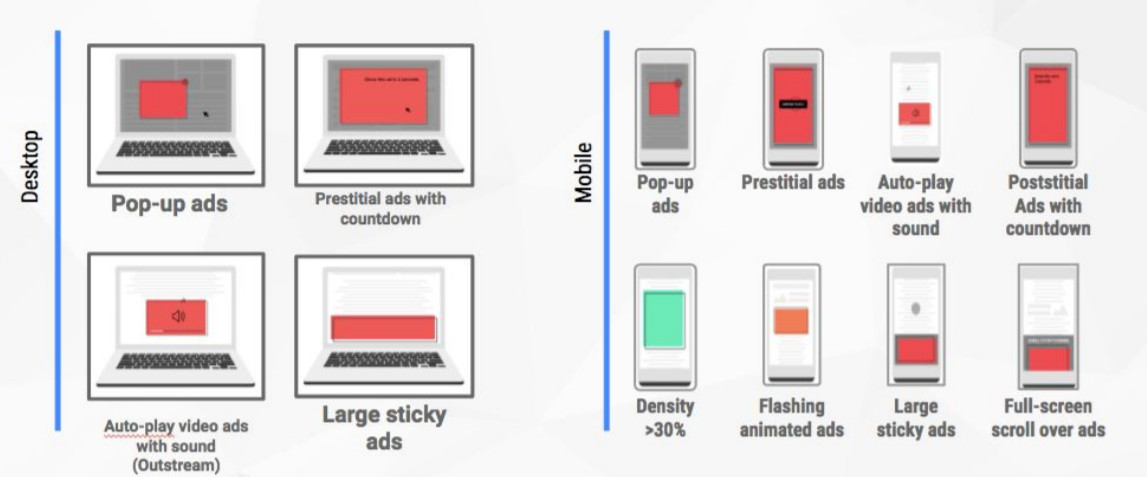
Types of Ads Google will automatically block

Google’s argument is that Ads are not bad, it’s undisciplined individuals who have made them a terrible experience for users. In an effort to ensure that user’s experience remains unhindered and content creators still earn a shilling, Google’s ad blocker will work to only block intrusive ads. So here are a few steps on how you can enable this feature:

Desktop
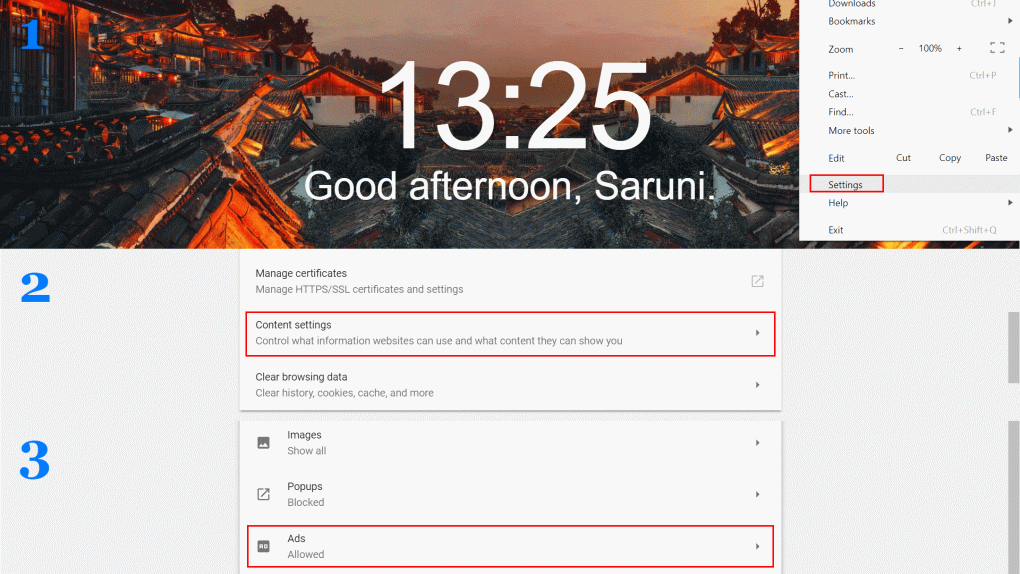
Chrome Adblocker Desktop

  1. Ensure you’re on the latest version of Google Chrome
  2. Go to settings by pressing the three dots on the top right
  3. Scroll down and tap advanced
  4. Tap on Content settings
  5. Scroll down to Ads and ensure that ads are blocked

Mobile
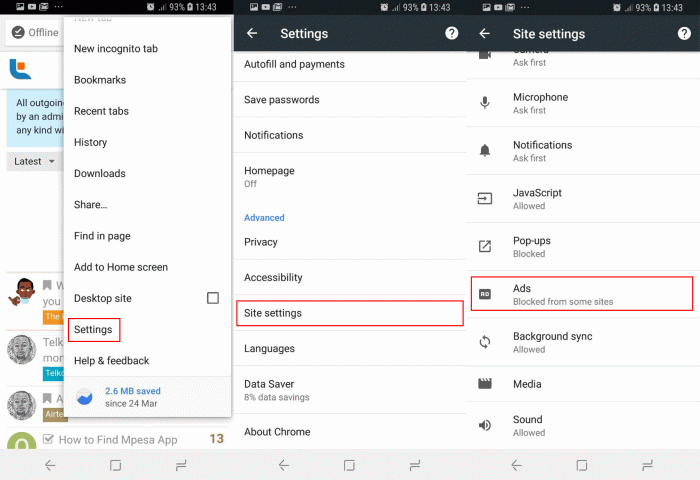
Chrome Adblocker Mobile

  1. Ensure you’re on the latest version of Google Chrome on your phone
  2. Go to settings by pressing the three dots on the top right
  3. Under the Advanced category, tap Site Settings
  4. Scroll down to Ads and ensure that ads are blocked.

This feature is only available in Chrome, other browsers such as Opera have their own inbuilt ad blockers that they are aggressive as third-party blockers. The feature is on by default on Google Chrome and we recommend using Chrome’s inbuilt ad blocker as opposed to third-party services such as AdBlock and AdBlock Plus.


Tags: Chrome
SendShare148Tweet92
Saruni Maina

Saruni Maina

I Google Bing until it Yahoos! | Email: [email protected]

Related Posts

Googlebook

Google’s New Laptop Is Called Googlebook, and It Runs on Android

May 14, 2026
ChatGPT Atlas

OpenAI Launches ChatGPT Atlas Browser to Challenge Chrome

October 22, 2025
Chrome

Google Is Turning Chrome Into an AI-Browser Using Gemini

September 20, 2025
Perplexity AI

Perplexity AI Makes $34.5 Billion Bid for Google Chrome

August 13, 2025
AI

OpenAI and Perplexity Launch Browsers to Rival Google Chrome

July 10, 2025
google-chrome

Three Billion Chrome Browser Users at Risk from Zero Day Hack

June 3, 2025

Latest

Tangle Is What Happens When Texting Meets a Phone Call

Tangle Is What Happens When Texting Meets a Phone Call

September 4, 2026
ChatGPT, Grok, and Claude

ChatGPT, Claude and Grok All Went Down on the Same Day

September 4, 2026
BAKE Condemns Abduction of Standard Group Editor Alex Kiprotich

BAKE Condemns Abduction of Standard Group Editor Alex Kiprotich

September 3, 2026
X (Twitter)

X Is Fighting an AI Bot Problem, but Real Users Are Getting Caught Too

September 3, 2026
Women in STEM Africa Summit 2026 Opens in Nairobi With Call for Investment

Women in STEM Africa Summit 2026 Opens in Nairobi With Call for Investment

September 3, 2026
Uber

Uber Cuts 10% of Its Workforce as It Exits Two African Markets

September 3, 2026

Best devices

Best Infinix Phones of 2025

Best Infinix Phones of 2025: Budget Prices With Premium Features

December 31, 2025

The Best Infinix Accessories Worth Buying in 2025

November 26, 2025

Best Budget Wireless Earbuds To Buy in Kenya (2025)

October 8, 2025

Samsung Galaxy A36 5G vs Samsung Galaxy A56 5G: Comparison Review

August 29, 2025

Infinix Hot 60 Pro+ vs Infinix Hot 60i: Comparison Review

August 22, 2025

Best Budget Smartwatches To Buy in Kenya 2025

February 13, 2025

Techweez is where tomorrow’s tech stories break today, thanks to intelligent analysis, real-world insight, and visionary storytelling.

Follow Us

Editorials

Tangle Is What Happens When Texting Meets a Phone Call

Absa Next Is Building Something Different From a Banking App

Flighty App: A Flight Tracker With an Early Warning System

Convos Wants to Be the First Messaging App Built for the Age of AI

Marvel Snap: Marvel Heroes, Strategy, and Quick Matches Into One Card Game

Swooni: The App That Helps Couples Build Stronger Relationships One Minute at a Time

More News

Ruto Orders KRA to Reverse Consolidated Cargo Benchmark to KES 2.5 Million

Kenya High Court Blocks 18% Commission Cap for Uber and Bolt

Uber Shuts Down Nigeria and Uganda Operations

Kenyan Firm DigiTax Launches in UAE, Targets 10 More Markets by 2026

DStv Is Planning to Launch a KES 3,000 Standalone Sports Package

Four Chinese Nationals in Custody Over SIM-Swap Fraud as DCI Seizes KES 1.1M Cash

  • Terms Of Use
  • Techweez Brand
  • Privacy & Policy
  • Contact Us

© 2024 Techweez - Palahala Media Group may earn a commission when you buy through links on our sites.
A Palahala Media Group Brand. All rights reserved.
.

Welcome Back!

Login to your account below

Forgotten Password?

Retrieve your password

Please enter your username or email address to reset your password.

Log In

Add New Playlist

Techweez | Tech News, Reviews, Deals, Tips and How To
Crunchy Cookies 🍪 Ahead!

Hey there! Just a heads-up: we're big fans of cookies - both the digital and edible kind! 🍪 We use our cookies and some from third parties to ensure your browsing experience on our site is smooth sailing and secure.


But wait, there's more! We also use cookies to gather stats and insights on how you navigate our site. It's like getting a behind-the-scenes peek at your digital adventures!


Don't worry, you're in control. You can adjust your cookie settings anytime to suit your preferences. Feeling curious? Dive into our Privacy Policy for all the juicy details. Happy browsing! 🚀

Functional Always active
Listen, this legal stuff is about as exciting as watching paint dry. But it basically says we only use your stuff for what you asked us to do, and nobody else gets to peek!
Preferences
The technical storage or access is necessary for the legitimate purpose of storing preferences that are not requested by the subscriber or user.
Statistics
It's those sneaky cookie crumbs websites leave behind to count visitors, like counting ants at a picnic! Totally harmless, just for fun facts. The technical storage or access that is used exclusively for anonymous statistical purposes. Without a subpoena, voluntary compliance on the part of your Internet Service Provider, or additional records from a third party, information stored or retrieved for this purpose alone cannot usually be used to identify you.
Marketing
Hey there! Just letting you know we use some fancy gizmos to remember your preferences. This way, we can show you ads that are, well, not completely bananas.
Manage options Manage services Manage {vendor_count} vendors Read more about these purposes
Make cookies
{title} {title} {title}
Techweez | Tech News, Reviews, Deals, Tips and How To
Crunchy Cookies 🍪 Ahead!
To provide the best experiences, we use technologies like cookies to store and/or access device information. Consenting to these technologies will allow us to process data such as browsing behavior or unique IDs on this site. Not consenting or withdrawing consent, may adversely affect certain features and functions.
Functional Always active
Listen, this legal stuff is about as exciting as watching paint dry. But it basically says we only use your stuff for what you asked us to do, and nobody else gets to peek!
Preferences
The technical storage or access is necessary for the legitimate purpose of storing preferences that are not requested by the subscriber or user.
Statistics
It's those sneaky cookie crumbs websites leave behind to count visitors, like counting ants at a picnic! Totally harmless, just for fun facts. The technical storage or access that is used exclusively for anonymous statistical purposes. Without a subpoena, voluntary compliance on the part of your Internet Service Provider, or additional records from a third party, information stored or retrieved for this purpose alone cannot usually be used to identify you.
Marketing
Hey there! Just letting you know we use some fancy gizmos to remember your preferences. This way, we can show you ads that are, well, not completely bananas.
Manage options Manage services Manage {vendor_count} vendors Read more about these purposes
Make cookies
{title} {title} {title}
No Result
View All Result
  • News
  • Reviews
  • Features
  • Editorial
  • Automotive
  • Entertainment

© 2024 Techweez - Palahala Media Group may earn a commission when you buy through links on our sites.
A Palahala Media Group Brand. All rights reserved.
.