• Latest
  • All
  • How To
Windows 10 November Update

Microsoft’s First Major OS Update Is Here: Windows 10 November Update

November 14, 2015
KOKO Networks Puts Its Ethanol Empire Up For Sale

KOKO Networks Puts Its Ethanol Empire Up For Sale

July 8, 2026
Betting

New Betting Rules Let Families Request Gambling Bans for Loved Ones

July 8, 2026
Vodafone’s 55% Stake Gives It Control Over Safaricom Boardroom

Vodafone’s 55% Stake Gives It Control Over Safaricom Boardroom

July 8, 2026
Starlink

Starlink Suspends New Signups Across 7 Kenyan Counties as Capacity Fills Up

July 8, 2026
DHgate Tablet Cases deals
Muse Image

Meta Launches Muse Image, Its First In-House AI Image Generator

July 8, 2026
IEBC

IEBC Temporarily Suspends Online Voter Services During ICT System Upgrade

July 8, 2026
AI

Kenya’s AI Policy, As the Government Sees It

July 7, 2026
Why Netflix’s Biggest Shows Keep Losing Millions of Viewers After Season One

Why Netflix’s Biggest Shows Keep Losing Millions of Viewers After Season One

July 7, 2026
Folarin Balogun

FIFA Reverses Balogun Red Card Suspension After Trump Intervenes

July 7, 2026
Microsoft

Microsoft Cuts 4,800 Jobs With Xbox Losing 20% of Its Staff

July 7, 2026
Midjourney

Disney, Universal, and Warner Bros. Sue Midjourney Over AI Copyright Claims

July 7, 2026
Software

Finance Act 2026 Increases Software and Cloud Service Costs by 25%

July 6, 2026
Techweez | Tech News, Reviews, Deals, Tips and How To
  • News
  • Entertainment
  • Reviews
  • Features
  • Editorial
No Result
View All Result
Techweez | Tech News, Reviews, Deals, Tips and How To
  • News
  • Entertainment
  • Reviews
  • Features
  • Editorial
No Result
View All Result
Techweez | Tech News, Reviews, Deals, Tips and How To
No Result
View All Result

Microsoft’s First Major OS Update Is Here: Windows 10 November Update

Latiff Cherono by Latiff Cherono
November 14, 2015
in Reviews
Reading Time: 6 mins read
260
5
Windows 10 November Update

The first major update to Windows 10 is now available.

Windows 10 November Update
The first major update to Windows 10 is now available.

The launch of Windows 10 by Microsoft on Jul 29th 2015, initiated a huge shift in the development and deployment of its pervasive operating system. Whereas previous versions of Windows received a major update every few years, Windows 10 has moved into the rapid release “Software as a Service” (SaaS) model. This means that Windows 10 is essentially in a perpetual state of improvement with significant updates being delivered to users several times a year. The first of these updates, Windows 10 November Update, is now available to consumers.
Windows 10 November Update
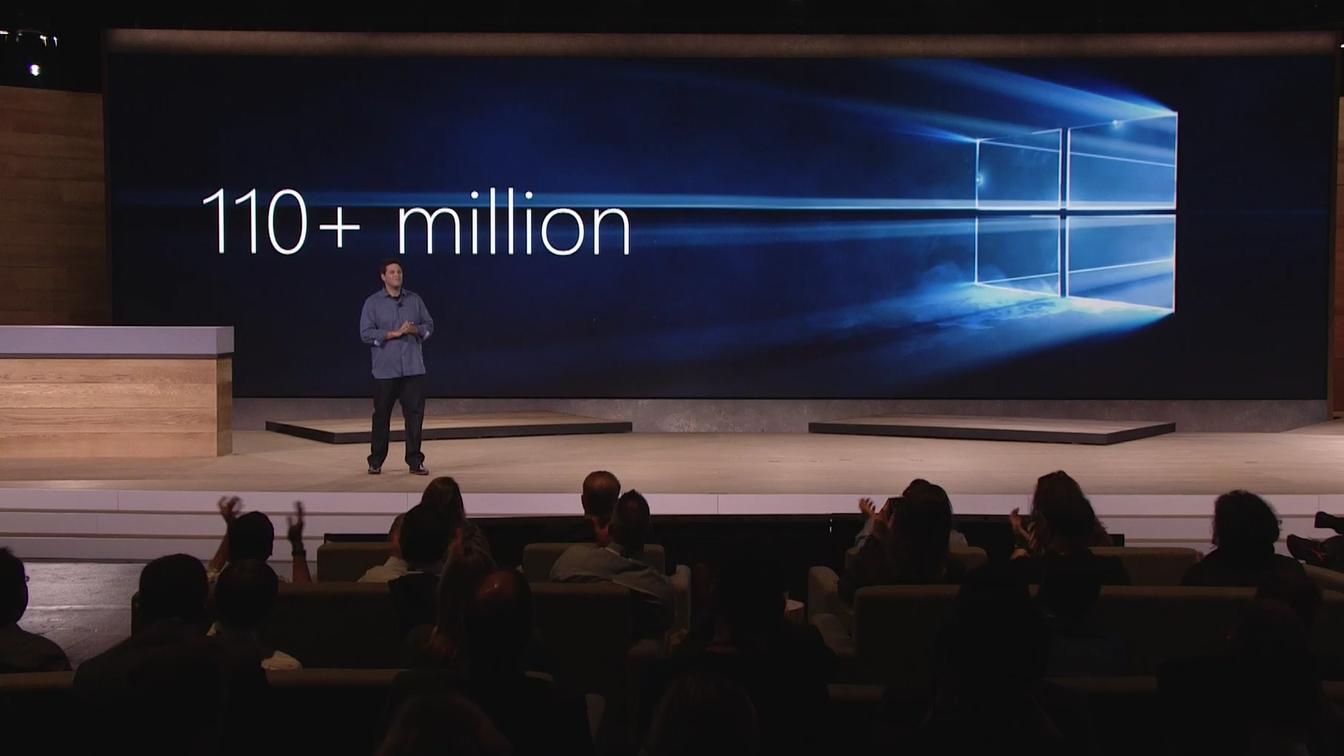
10 weeks after launch, Windows 10 had over 110 million installs.

Even though this may seem as the first major update to Windows 10 since it was launched, Windows 10 goes through a rigorous testing process that not only involves dog feeding new build throughout Microsoft’s 100,000 employees, but more importantly the new features are tested by the 7 million strong Windows Insider community. This feedback loop allows the real-time collection of improvement telemetry data and enables problems to be solved faster. Windows 10 was made available to consumers under Build 10240 (this is the the revision number of the OS build compilation). The culmination of all this testing and development is the Windows 10 November Update Build that is available to general consumers via Windows Update today.

  • 110 Million Active Windows 10 installs (On October 6th)
  • 12 million Business Devices running Windows 10
  • 5 Windows 10 Insiders Builds released to Insiders since July 29th.

The Windows 10 November Update doesn’t bring any new major changes, but can be thought of as putting the polish on an already solid operating system. The features and improvements are included in the Windows 10 November Update are listed below.

Windows 10 November Update Features and Improvements

Activation

.

Since Microsoft has made Windows 10 a free upgrade for Windows 7, Windows 8 and Windows 8.1 owners, users can now enter their genuine product key from either one of the version listed above and activate their Windows 10 installation. This is done by going to Settings > Update & Security > Activation then selecting Change Product Key. If you do a clean install of Windows 10 by booting off the media, you can also enter the product key from prior Windows versions on qualifying devices during setup.

Login

  • Windows Background Image: You can now turn off the Windows background picture in the sign-in screen if you want by going to the Settings app > Personalization > Lock screen and turning off “Show Windows background picture on the sign-in screen”.
  • Login Improvements: Windows 10 will now also remember your previous login method. e.g. If you signed in with a Picture password, it will open this method on the time that you login into your device.

Performance

  • Memory Manager:  When Memory Manager feels memory pressure, it will compress unused pages instead of writing them to disk. This reduces the amount of memory used per process, allowing Windows 10 to maintain more applications in physical memory at a time.
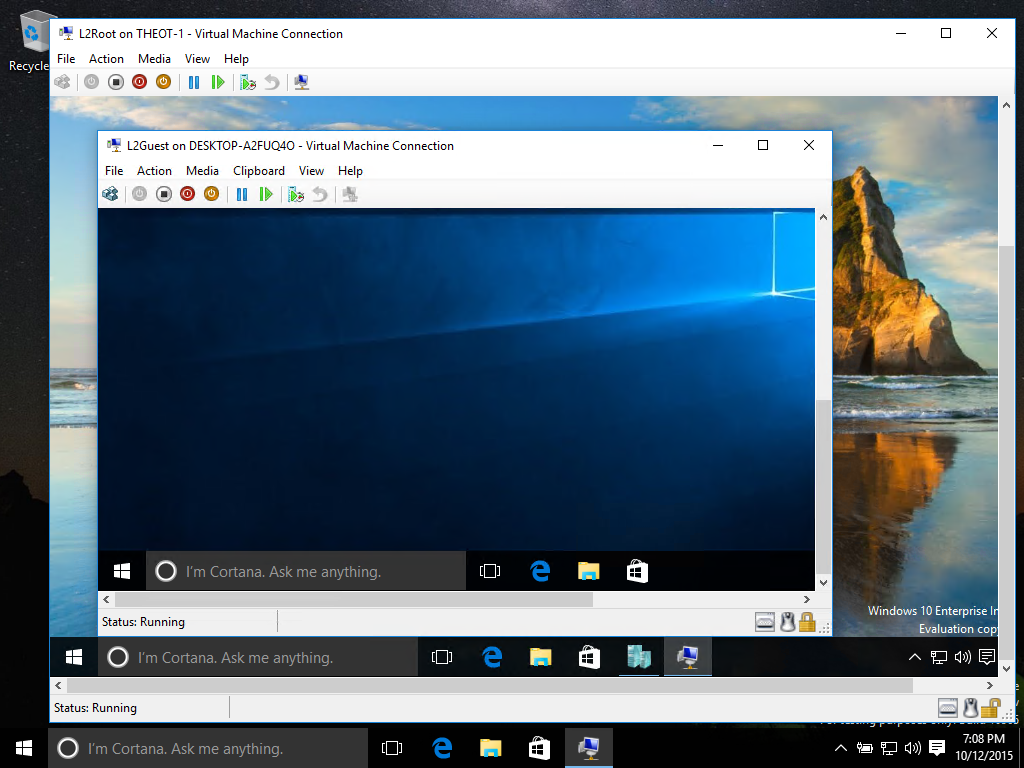
  • Nested Hyper -V Virtualizations: For those users who run Hyper-V, you can now run a Hyper-V virtualization, within another Hyper-V instance.
  • Boot Times: Windows 10 November Update now bots 30% faster than the same machine running Windows 7
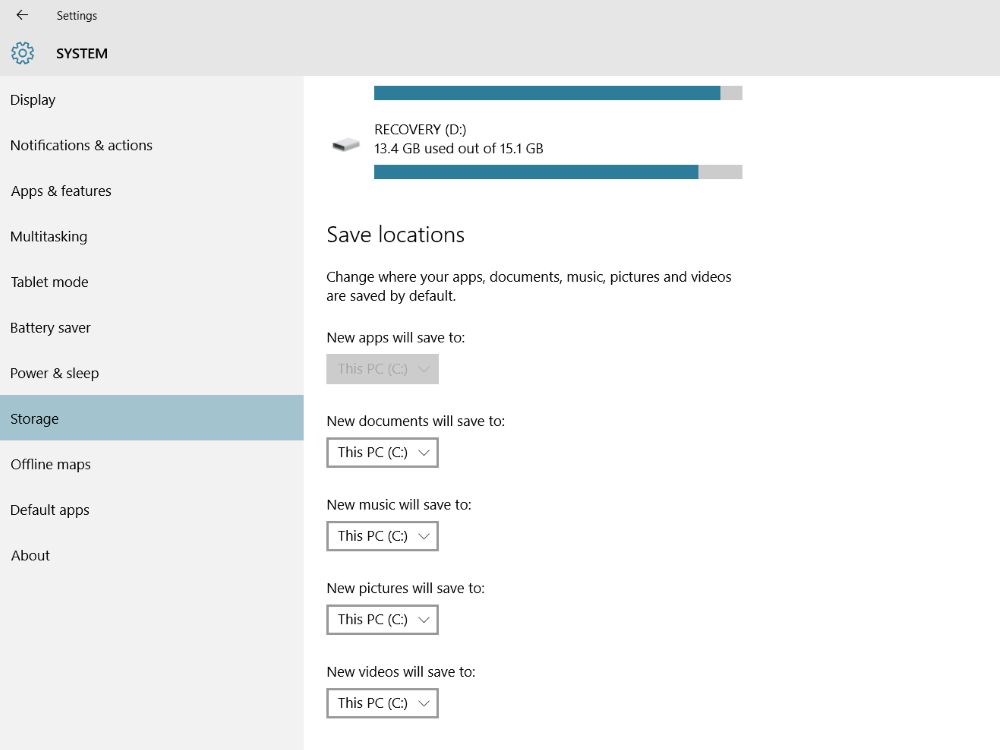
  • App Storage: The user can now designate which drive to install apps (eg External Staorage, Expandable Memory). This is espcially helpful on devices with limited storage like the Tecno Winpad 10.
Windows 10 November Update
Apps can now be installed on drives other than the main C drive. This includes removable storage.
Windows 10 November Update
You can now nest Hyper-V virtualizations.

Start Screen & UI Personalizations

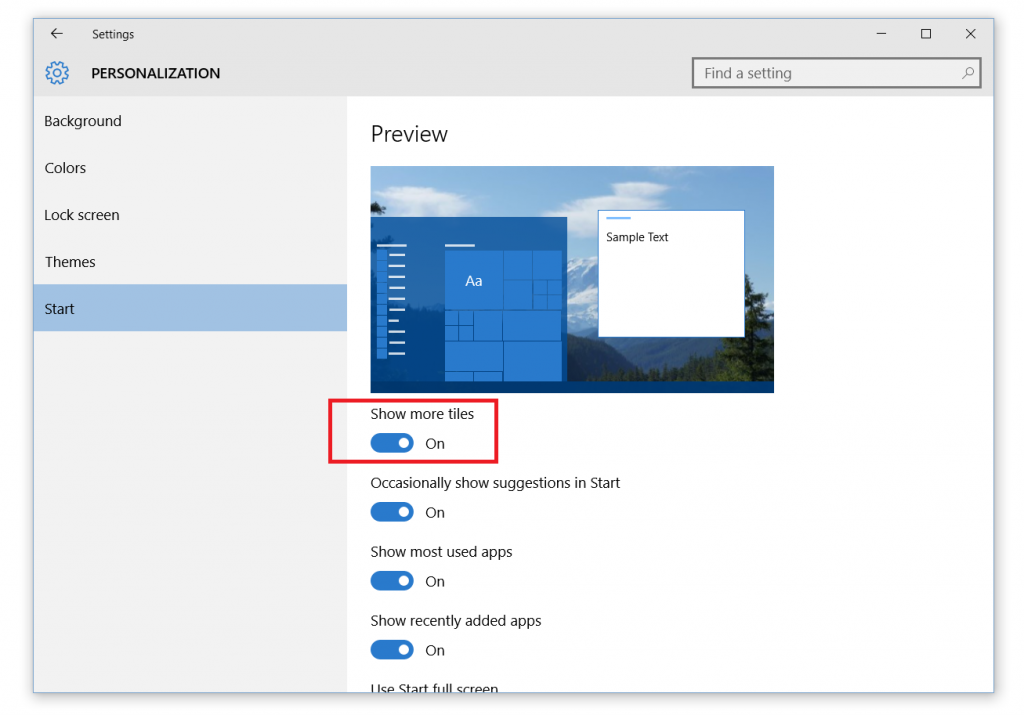
  • Improvements to Start: The default for tile groups on Start is to have 3 columns of medium sized tiles, but many Insiders wanted the ability to have a 4th column as well, so they could have two wide or large sized tiles side by side in a group. In this build, you can enable this by going to the Settings app > Personalization > Start and enabling “Show more tiles”. And for the Insiders that want more than 512 tiles on Start; we now support up to 2048.
  • Improvements to Tablet mode: When in Tablet mode, from Task View you can now snap apps to left and right, replace a previously snapped app with another (teeter) and swipe down to close an app.
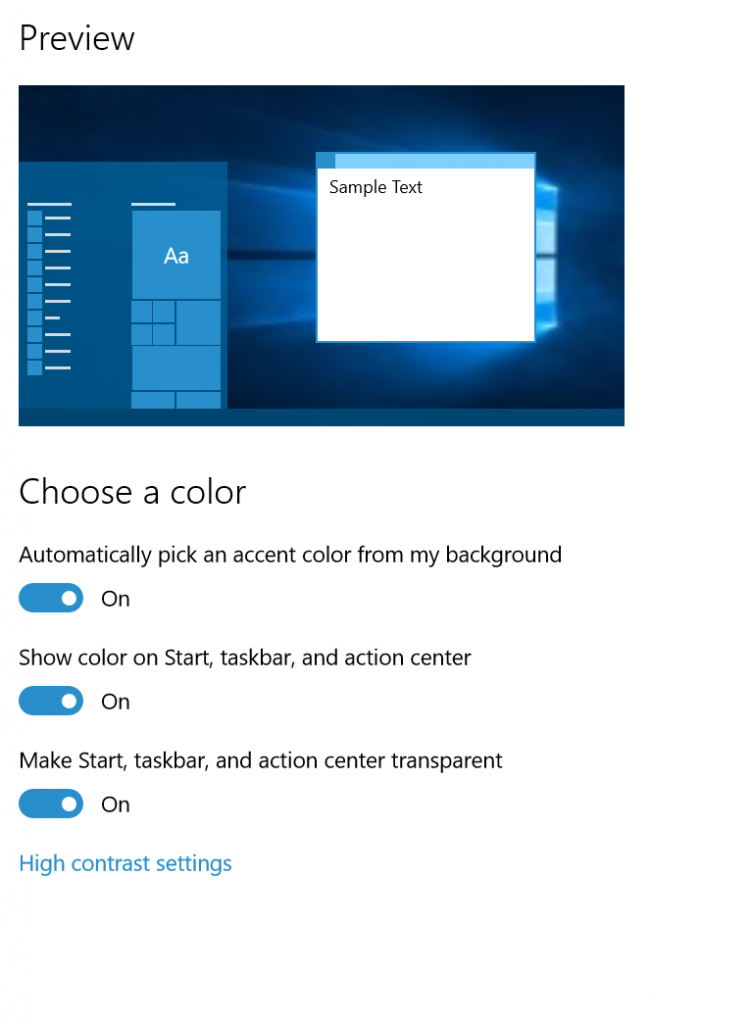
  • Updated color options: You can now change the default color for Start, Acton Center, Taskbar, and Title bars. You can turn it on by by going to Settings > Personalization > Colors.
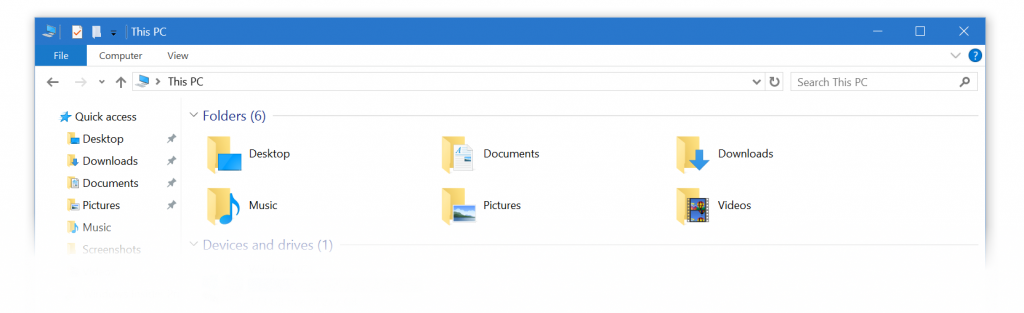
  • More vibrant title bars: Thanks to feedback from Windows Insiders, with this build you can now enjoy your title bars with a full color intensity that matches the rest of your theme. Title bars will now appear darker. You can adjust the color by going to Settings > Personalization > Colors. Colored title bars will appear only if “Show color on Start, Taskbar, Action Center, and Title bars” is enabled.
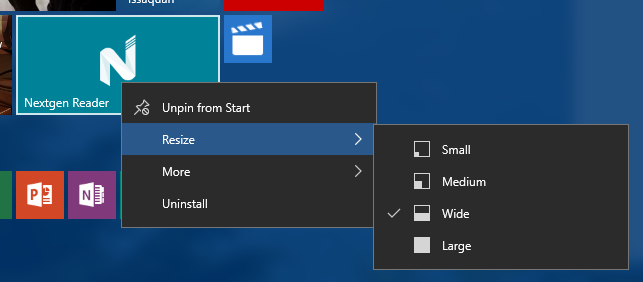
  • Improved context menus on Start: You will notice we have made some adjustments and improvements to the context menus on Start including new icons for tile adjustments.
  • New icons:We know Windows Insiders love new icons – this build has another batch of new icons for devices (check out Device Manager). Registry Editor finally gets a new icon!
Windows 10 November Update
Improved Context menus.
Windows 10 November Update
Users now have an expanded range of color options.
Windows 10 November Update
Title bars can now have color.

Windows 10 November Update
The start screen columns can be expanded to hold 4 columns of tiles

Cortana

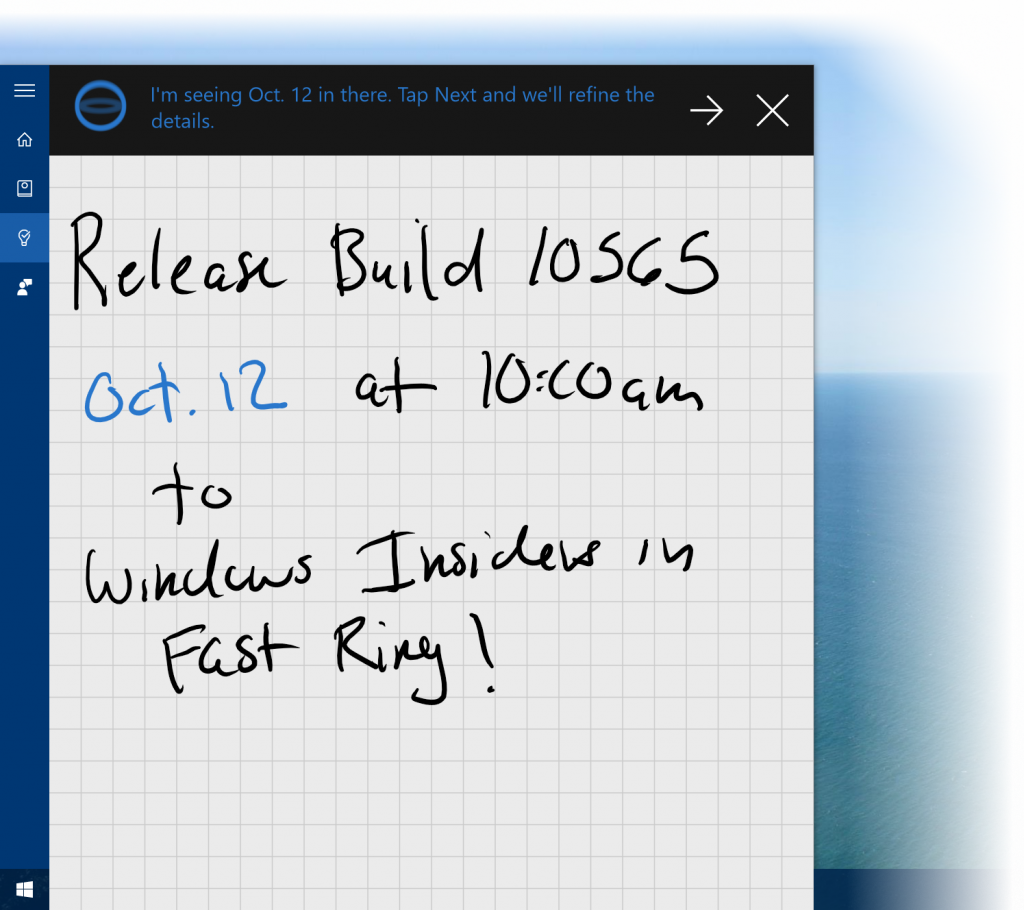
  • Cortana is able to intelligently understand your inked notes – setting reminders based on locations, times and numbers that she can understand from your digital annotations.
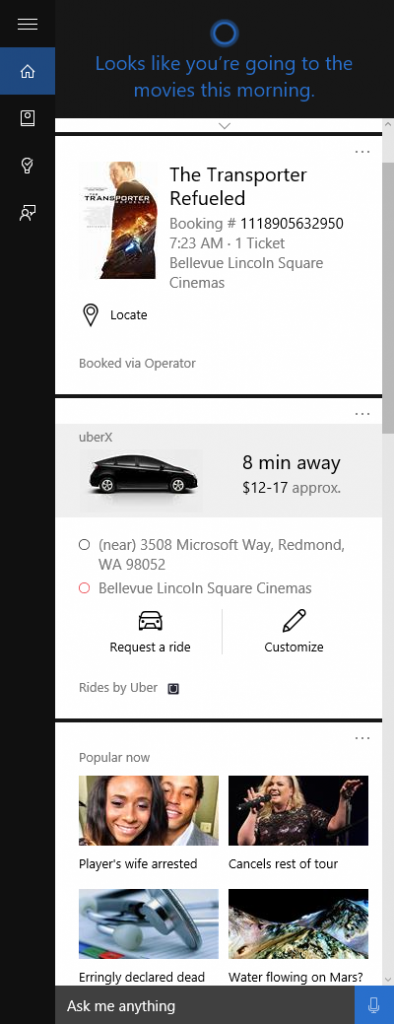
  • Cortana to help you keep track of your leisure time: This includes movie and event reminders. Cortana will keep track of your bookings for movies and ticketed events through your email confirmations. Two hours prior to the event start time
  • Ask Cortana inside PDFs in Microsoft Edge: You can now highlight text while reading a PDF in Microsoft Edge and right-click to “Ask Cortana” to find additional information
  • Use Cortana with your local account:  Users will now be able to use Cortana with a local account (i.e. one which is not connected to a Microsoft account.
  • Connected Accounts – You can now connect your Uber, Xbox Live, LinkedIn and Office 365 accounts to Cortana.
Windows 10 November Update
With a pen enabled device, you can now write notes into Cortana.
Windows 10 November Update
Connected Accounts help you have access to pertinent information when you need it.

Integrated Skype Apps

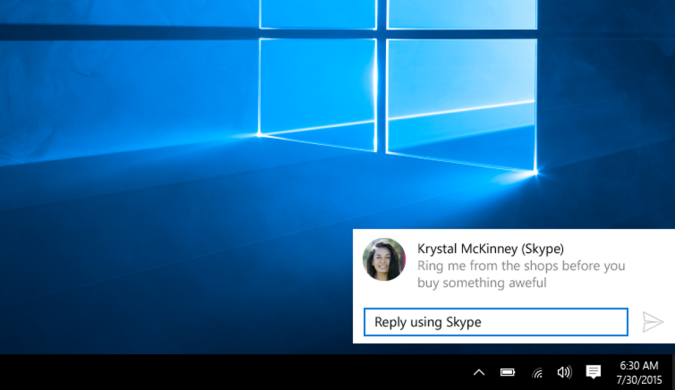
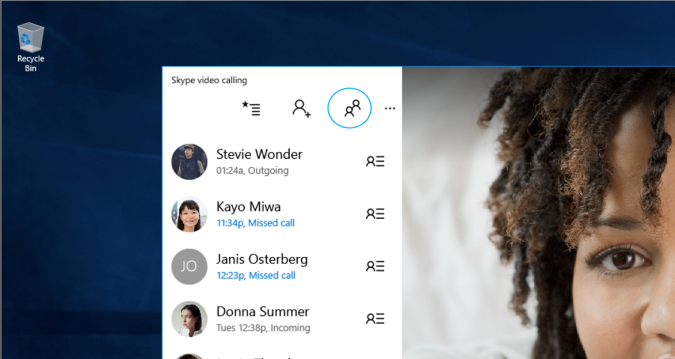
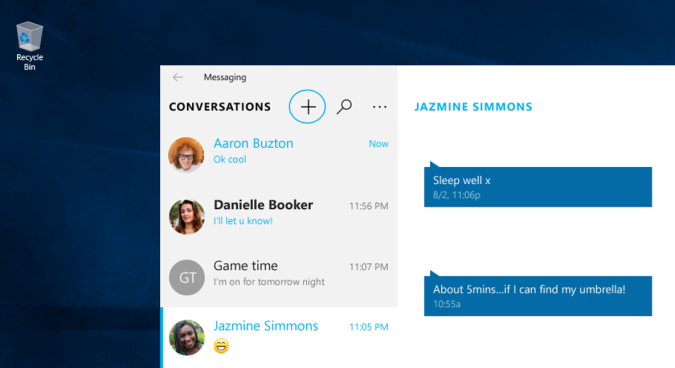
Skype messaging, calling and video capabilities will come integrated into Windows 10 through the Messaging, Phone and Skype video universal Windows apps. These Windows applications enable quick and easy, free calling and messaging to other Skype users across phones, over 3G/4G and Wi-Fi tablets and to PCs Wi-Fi. With this build, you can preview the integrated capabilities on your PC while an upcoming Windows 10 Mobile Insider Preview build will have these integrated capabilities for you to preview soon on mobile devices.
Windows 10 November Update
The new messaging app integrates with your contact list.
Windows 10 November Update
The new Messaging app.
Windows 10 November Update
The messaging app now has a quick reply feature built into notifications.

Microsoft Edge

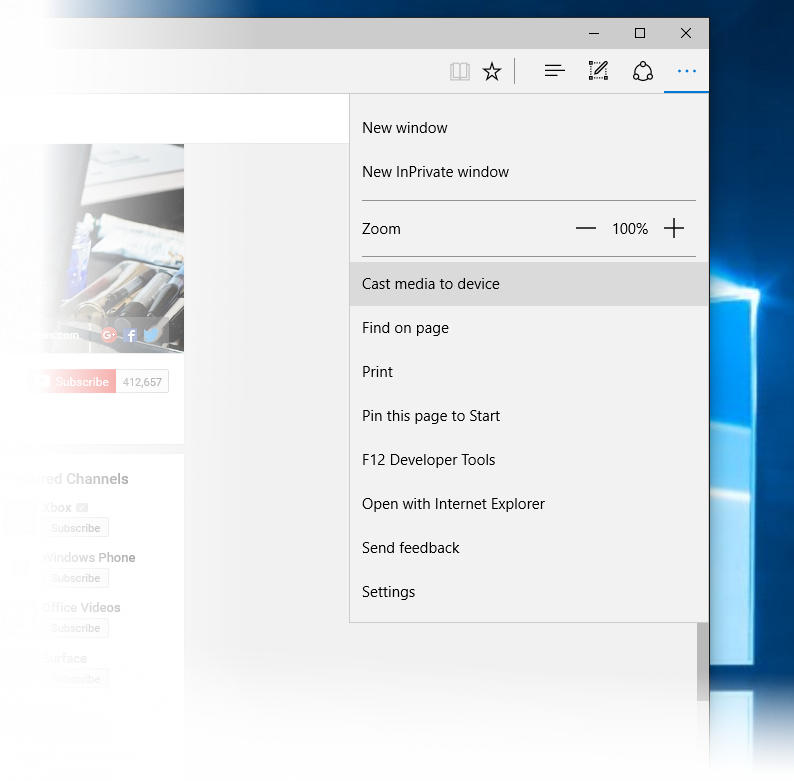
  • Media Casting in Microsoft Edge: You can now use Microsoft Edge to cast video, picture, and audio content from your browser to any Miracast and DLNA enabled device on your network.
    • Cast a video from YouTube: Go to YouTube.com in Microsoft Edge. Click on the “…” menu and the top left, and select “Cast media to device” and select the Miracast or DLNA device you want to cast to.
    • Cast a Facebook photo album: Login to Facebook in Microsoft Edge and click on the first photo in one of your photo albums to cast. Click on the “…” menu and the top left, and select “Cast media to device” and select the Miracast or DLNA device you want to cast to. Navigate through your photo album by clicking on the forward and backward buttons.
    • Cast your music from Pandora: Login to Pandora in Microsoft Edge to get to your music and click on the “…” menu and the top left, and select “Cast media to device” and select the Miracast or DLNA device you want to cast to.
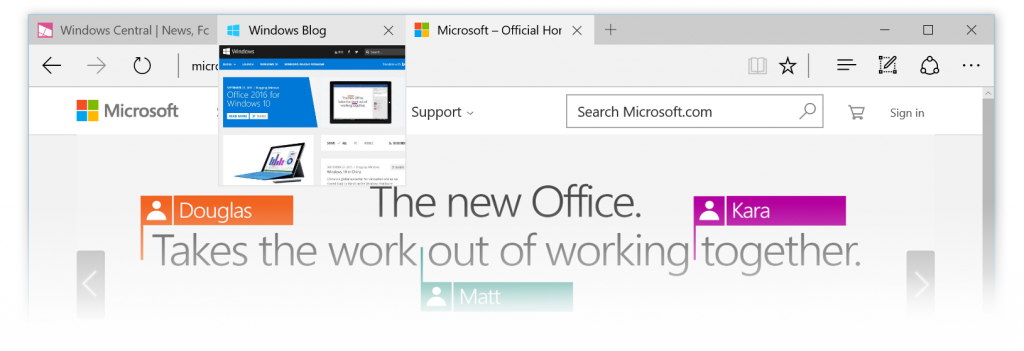
  • Tab Preview in Microsoft Edge: In Microsoft Edge, you can now hover over your open tabs and get a preview of what’s on those websites. Check it out and let us know what you think.
  • Syncing Favorites and Reading list items in Microsoft Edge: In this build, you’ll see a first look at the new syncing feature in Microsoft Edge that lets you sync your Favorites and Reading list items. We are still working on refining it, but definitely check it out and let us know what you think.

NOTE: One of the most requested features by users of Windows 10 is Extension Support for the Edge browser. Though Microsoft had hoped to have this ready on this update.
Windows 10 November Update
The Edge browser supports media casting.
Windows 10 November Update
The Edge browser now gives live previews of each tab.

Apps

All of the new Windows 10 apps like Mail, Calendar, Groove Music, Maps, Touch Office Apps, Photos, Xbox App and more have received multiple updates since the launch of Windows 10. This is possible because all these apps are available through the Microsoft Store. To check to see if your apps are up to date: Open the Store App, login with your Microsoft account, click on your profile and select Updates.

How To Get The Windows 10 November Update

For those of you who already have Windows 10 installed on your devices, all you have to do is go to Settings > Update & Security > Windows Updates > Check For Updates. The update will download and install on your device.

If you haven’t received your free update yet, not to worry as this update will be included in the Windows 10 installation files.


If you have any issues with the Windows 10 November Update, or if you found a new improvement that you really like, please let us know in the Techweez Forums.


 

Tags: CortanaMicrosoftSkypeWindows 10
SendShare148Tweet92
Latiff Cherono

Latiff Cherono

Ardent Windows Phone Enthusiast (Since Launch in Oct 2010) and huge Microsoftie (from Office 365, Surface to Visual Studio). Mechanical Engineer (Lean MFG, Six Sigma). If you ever have any questions on anything Microsoft related, reach out via Twitter.

Related Posts

Microsoft

Microsoft Cuts 4,800 Jobs With Xbox Losing 20% of Its Staff

July 7, 2026
Sony PlayStation

Sony to End Physical PlayStation Game Discs Starting January 2028

July 1, 2026
Windows 10

Microsoft Quietly Extends Windows 10 Security Updates to 2027

June 26, 2026
Apple raises base MacBook Air to $1,299 and MacBook Pro to $1,999

Apple Hikes Prices for Core Products by Upto 54% With Xbox Following Suit

June 26, 2026
Nvidia RTX laptop

Nvidia Wants to Sell You a PC Again

June 2, 2026
Data center

Kenya’s $1 Billion Microsoft AI Data Center Project Stalls Over Electricity Limits

May 8, 2026

Latest

KOKO Networks Puts Its Ethanol Empire Up For Sale

KOKO Networks Puts Its Ethanol Empire Up For Sale

July 8, 2026
Betting

New Betting Rules Let Families Request Gambling Bans for Loved Ones

July 8, 2026
Vodafone’s 55% Stake Gives It Control Over Safaricom Boardroom

Vodafone’s 55% Stake Gives It Control Over Safaricom Boardroom

July 8, 2026
Starlink

Starlink Suspends New Signups Across 7 Kenyan Counties as Capacity Fills Up

July 8, 2026
Muse Image

Meta Launches Muse Image, Its First In-House AI Image Generator

July 8, 2026
IEBC

IEBC Temporarily Suspends Online Voter Services During ICT System Upgrade

July 8, 2026

Best devices

Best Infinix Phones of 2025

Best Infinix Phones of 2025: Budget Prices With Premium Features

December 31, 2025

The Best Infinix Accessories Worth Buying in 2025

November 26, 2025

Best Budget Wireless Earbuds To Buy in Kenya (2025)

October 8, 2025

Samsung Galaxy A36 5G vs Samsung Galaxy A56 5G: Comparison Review

August 29, 2025

Infinix Hot 60 Pro+ vs Infinix Hot 60i: Comparison Review

August 22, 2025

Best Budget Smartwatches To Buy in Kenya 2025

February 13, 2025

Techweez is where tomorrow’s tech stories break today, thanks to intelligent analysis, real-world insight, and visionary storytelling.

Follow Us

Editorials

Inside Bumble, the Dating App Where Women Call the Shots

Locket: Photo Sharing App With No Feed, No Likes, and No Algorithms

Couple Joy: A Long-Distance Dating App That Builds Intimacy in Small Daily Acts

Airbuds: The App That Turns Your Music Into a Social Feed

Kenya Might Need to Crack Down on Wealth Porn Like China

Techweez and Gearhaus Score BAKE Awards 2026 Nominations

More News

Kenya’s AI Policy, As the Government Sees It

Why Netflix’s Biggest Shows Keep Losing Millions of Viewers After Season One

FIFA Reverses Balogun Red Card Suspension After Trump Intervenes

Microsoft Cuts 4,800 Jobs With Xbox Losing 20% of Its Staff

Disney, Universal, and Warner Bros. Sue Midjourney Over AI Copyright Claims

Finance Act 2026 Increases Software and Cloud Service Costs by 25%

  • Terms Of Use
  • Techweez Brand
  • Privacy & Policy
  • Contact Us

© 2024 Techweez - Palahala Media Group may earn a commission when you buy through links on our sites.
A Palahala Media Group Brand. All rights reserved.
.

Welcome Back!

Login to your account below

Forgotten Password?

Retrieve your password

Please enter your username or email address to reset your password.

Log In

Add New Playlist

Techweez | Tech News, Reviews, Deals, Tips and How To
Crunchy Cookies 🍪 Ahead!

Hey there! Just a heads-up: we're big fans of cookies - both the digital and edible kind! 🍪 We use our cookies and some from third parties to ensure your browsing experience on our site is smooth sailing and secure.


But wait, there's more! We also use cookies to gather stats and insights on how you navigate our site. It's like getting a behind-the-scenes peek at your digital adventures!


Don't worry, you're in control. You can adjust your cookie settings anytime to suit your preferences. Feeling curious? Dive into our Privacy Policy for all the juicy details. Happy browsing! 🚀

Functional Always active
Listen, this legal stuff is about as exciting as watching paint dry. But it basically says we only use your stuff for what you asked us to do, and nobody else gets to peek!
Preferences
The technical storage or access is necessary for the legitimate purpose of storing preferences that are not requested by the subscriber or user.
Statistics
It's those sneaky cookie crumbs websites leave behind to count visitors, like counting ants at a picnic! Totally harmless, just for fun facts. The technical storage or access that is used exclusively for anonymous statistical purposes. Without a subpoena, voluntary compliance on the part of your Internet Service Provider, or additional records from a third party, information stored or retrieved for this purpose alone cannot usually be used to identify you.
Marketing
Hey there! Just letting you know we use some fancy gizmos to remember your preferences. This way, we can show you ads that are, well, not completely bananas.
Manage options Manage services Manage {vendor_count} vendors Read more about these purposes
Make cookies
{title} {title} {title}
Techweez | Tech News, Reviews, Deals, Tips and How To
Crunchy Cookies 🍪 Ahead!
To provide the best experiences, we use technologies like cookies to store and/or access device information. Consenting to these technologies will allow us to process data such as browsing behavior or unique IDs on this site. Not consenting or withdrawing consent, may adversely affect certain features and functions.
Functional Always active
Listen, this legal stuff is about as exciting as watching paint dry. But it basically says we only use your stuff for what you asked us to do, and nobody else gets to peek!
Preferences
The technical storage or access is necessary for the legitimate purpose of storing preferences that are not requested by the subscriber or user.
Statistics
It's those sneaky cookie crumbs websites leave behind to count visitors, like counting ants at a picnic! Totally harmless, just for fun facts. The technical storage or access that is used exclusively for anonymous statistical purposes. Without a subpoena, voluntary compliance on the part of your Internet Service Provider, or additional records from a third party, information stored or retrieved for this purpose alone cannot usually be used to identify you.
Marketing
Hey there! Just letting you know we use some fancy gizmos to remember your preferences. This way, we can show you ads that are, well, not completely bananas.
Manage options Manage services Manage {vendor_count} vendors Read more about these purposes
Make cookies
{title} {title} {title}
No Result
View All Result
  • News
  • Reviews
  • Features
  • Editorial
  • Automotive
  • Entertainment

© 2024 Techweez - Palahala Media Group may earn a commission when you buy through links on our sites.
A Palahala Media Group Brand. All rights reserved.
.