• Latest
  • All
  • How To
Galaxy Note II apps

Twelve apps you need on your Galaxy Note II

April 4, 2013
iOS 27

iOS 27: What Apple Announced at WWDC 2026

June 9, 2026
OpenAI

OpenAI Files for IPO, Joining Anthropic in Race to Go Public

June 9, 2026
eCitizen

Government Plans to Sell eCitizen and State Data to Generate Revenue in New Proposal

June 8, 2026
Former Isiolo MP Bahari Ali Appointed as Konza Technopolis Chairperson

Former Isiolo MP Bahari Ali Appointed as Konza Technopolis Chairperson

June 8, 2026
DHgate Tablet Cases deals
NTSA Speed Cameras

NTSA Automated Traffic Fines System Frozen by High Court Days After Launch

June 7, 2026
IP Rating

What IP Rating Mean on Smartphones and Devices

June 6, 2026
Airtel

How to Top Up Airtel Airtime from M-Pesa without Charges

June 5, 2026
How To Watch Your Speed and Avoid New NTSA Fines

How To Watch Your Speed and Avoid New NTSA Fines

June 5, 2026
The Housing Levy Was Never Really About Housing Now That It’s a Permanent Deduction

The Housing Levy Was Never Really About Housing Now That It’s a Permanent Deduction

June 5, 2026
Electric Vehicle (EV)

Kenya Power Brings EV Chargers Onto the Right Tariff

June 4, 2026
The Tools Kenya Has to Track Ebola and How They Work

The Tools Kenya Has to Track Ebola and How They Work

June 4, 2026
2026 World Cup

YouTube to Bring FIFA 2026 World Cup Matches With a Catch

June 4, 2026
Techweez | Tech News, Reviews, Deals, Tips and How To
  • News
  • Entertainment
  • Reviews
  • Features
  • Editorial
No Result
View All Result
Techweez | Tech News, Reviews, Deals, Tips and How To
  • News
  • Entertainment
  • Reviews
  • Features
  • Editorial
No Result
View All Result
Techweez | Tech News, Reviews, Deals, Tips and How To
No Result
View All Result

Twelve apps you need on your Galaxy Note II

Martin Gicheru by Martin Gicheru
April 4, 2013
in Entertainment
Reading Time: 6 mins read
264
0
Galaxy Note II apps

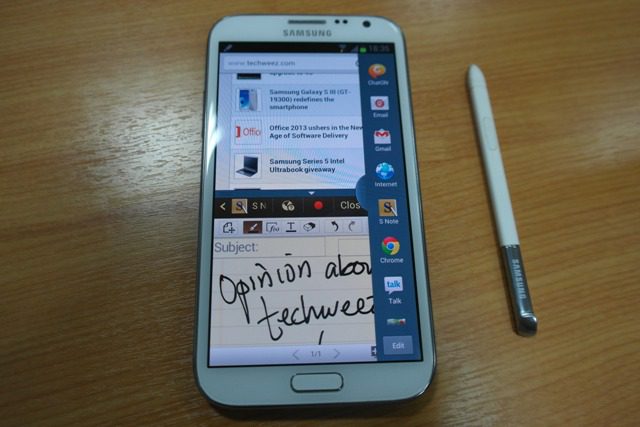
Galaxy Note II appsThese are not your usual stylus (S Pen) apps that make the experience different in a huge way than other smartphones. Okay, call it a phablet, either way it’s the best smartphone there is right now in my opinion. Let’s not argue if you haven’t used it. That sorted, there are apps you wish you knew existed immediately you set up your device and wondered where they were a month later after you discover them either through a search or referral.  The apps I have listed here are good for the Galaxy Note II with all its processing power, battery life, RAM and screen size. Makes it more of a productivity device. Also the apps I have listed here are not limited to the Galaxy Note, so if you are on Android, go ahead and install them.

App Backup and restore

This app is quite good when you have so many apps you want to install, and for a reason or another, wish to uninstall them for some time leaving them available for re-installing in a  near future. You see, not many of us have Wi-Fi at their beck and call, so you want to save those bundles when you already went through the installation process. This app allows you to archive the installation files of the apps you have installed, you can choose one or several and you have them stored either in the microSD or in phone’s mass storage in the absence of microSD. Reinstalling is one click, you can even export these files into another storage

App lock

Sometime you may want to restrict access to some apps without necessarily barring access to your phone. Say if you want to give your phone to a friend for them to experience without necessarily craning your neck to see whether they are already inside your messages and photo gallery. You can always install this app and set a password, then add the apps you wish to prevent access to. It even gives you an option to turn lock on or off to cater for situations where you are the one using the phone and don’t want to input login credentials every time you access an app.

Swiftkey for tablets

Well, Swiftkey is available for smartphones and would work better on this phone. Before I proceed, lets first agree that its the best keyboard on Android, while it is the most downloaded premium app on Android. Swiftkey for tablets is even better on larger displays over 4.65 inches since it splits the keyboard when in landscape mode, thanks @teriwanderi for helping me realize that. Swiftkey learns the way you write, learning your language from many applications like twitter, messaging, email or even your blog. So it will be suggesting words based on what you write and how you write, and believe you me, it learns fast, makes you type even faster and more accurately.

SMS Backup and restore

This is good when you need to switch devices and wish to keep an SMS string you had, probably with a client. You can export the texts and import them to another device and keep walking.

.

PesaDroid

Well, this would work for MPesa users, Kenyans feel me on this. For those of us who are entrepreneurs and are paid via Mpesa, you want to get this app to assist you track your Mpesa record. It’s not just spending, but business transactions. Get the paid app for two reasons, to support the Kenyan developer and also to get your statement exported to an excel sheet on request. Your banker will want this when you suddenly want an emergency loan. You even get a transaction assistant that will help you send money better. Reports are well defined and you can even group people you send and receive Mpesa to for easier management.

KRA PIN Checker

This one is another app by a Kenyan developer and will work in Kenya.  The app can assist you query the KRA (Kenya Revenue Authority) database for a business PIN. You could wish to verify if a certain business you are transacting with has a PIN for TAX purposes. It also offers a chance to check for tax compliance, no need to ask their accountants, fetch the info for yourself, information is power!

Pulse

I am a blogger and reader so you wouldn’t be surprised that I live this app and use it a lot. Pulse helps you keep track of your favourite news sources, just add from the available news sites and blogs or if you want to go specific, there is a search bar that will allow you add the specific blog or RSS you want to keep in touch with. I prefer this to Flipboard for that small and important reason of offline reading.

Pocket

Pocket is another reader app, but this one is more dynamic than Pulse. Formerly Read It Later, this app allows you to add blogs and links of any kind, including videos to the pocket app for offline reading, of-course off-line does not apply to videos, but you have them somewhere central as opposed to favoriting tweets, you know some will think you are stalking them. Pocket has a Chrome Web app that allows you to add and read on the web, the same app allows you to integrate twitter so you can add links directly from tweets.

Doubletwist

Music music music! Well this is one of the best music players on Android, I would wish to be notified of better apps though. Double twist for those of us who listen to music on the go, will work even on a locked screen and respond to the volume buttons and play controls on the home-screen. Plus you can create playlists easier, shuffle the whole album and other nice things.

Drippler

Drippler is an app that allows you keep in touch with what the blogs are saying about your specific device. You get hacks and tricks of your device model before your peers. It pushes notifications, so you get things in real-time, and you can read the whole meat of the blog post or video is the blog has the RSS available in full.

Airdroid

The moment you switch Airdroid on, it pushes a notification with URL on it that you can use to access the Android smartphone on your PC or Mac browser. This will work as long as you have the same Wi-Fi being accessed by both devices. Once connected you are able to access files in the smartphone and do better things that you would do with KIES, well except OS upgrades.

Dropbox

Last but not least, we have Dropbox. One you were not bound to miss for this productivity device. Cloud computing has become part of our daily lives, and you want to have those important files backed up incase anything happens to your mobile device. Your contacts are there with Gmail, why not ensure your much prized photos and files too. Quick tip: If you get access to Wi-Fi once in a while, set your files to sync every-time there is Wi-Fi, that way you need not remember when you need to sync files. But of-course if you find that you haven’t accessed on in a long time, sacrifice those data bundles to save your you-know-what.

Of-course here is where you list some of the apps you would wish us and other readers to discover and improve our experience on the smartphones/phablets.

Tags: Android AppsMobile AppsSamsung
SendShare147Tweet92
Martin Gicheru

Martin Gicheru

Martin is the Managing Editor at Techweez, passionate about personal tech and telling stories of consumer experiences. Talk to me: [email protected]

Related Posts

Android

Android Storage Hacks: How to Recover Space Your Phone Is Hiding

May 18, 2026
Samsung Galaxy S26 Ultra

Samsung Galaxy S26 Ultra Review: A Phone That Knows Exactly What It Is

Sawe Makes History with Entry-Level Forerunner 55

Sawe Breaks World Record Wearing a Basic Garmin Watch as Samsung Galaxy Crashes Party

April 28, 2026
Samsung Gaming Monitors

Samsung Tops Global Gaming Monitor Sales for Seventh Year Running

April 9, 2026
Samsung Galaxy A57 5G and A37 5G

Samsung Launches Galaxy A57 5G and A37 5G in Kenya

March 31, 2026
Samsung AI memory

Samsung Reveals Next-Gen AI Memory Built for NVIDIA’s Next AI Systems

March 23, 2026

Latest

iOS 27

iOS 27: What Apple Announced at WWDC 2026

June 9, 2026
OpenAI

OpenAI Files for IPO, Joining Anthropic in Race to Go Public

June 9, 2026
eCitizen

Government Plans to Sell eCitizen and State Data to Generate Revenue in New Proposal

June 8, 2026
Former Isiolo MP Bahari Ali Appointed as Konza Technopolis Chairperson

Former Isiolo MP Bahari Ali Appointed as Konza Technopolis Chairperson

June 8, 2026
NTSA Speed Cameras

NTSA Automated Traffic Fines System Frozen by High Court Days After Launch

June 7, 2026
IP Rating

What IP Rating Mean on Smartphones and Devices

June 6, 2026

Best devices

Best Infinix Phones of 2025

Best Infinix Phones of 2025: Budget Prices With Premium Features

December 31, 2025

The Best Infinix Accessories Worth Buying in 2025

November 26, 2025

Best Budget Wireless Earbuds To Buy in Kenya (2025)

October 8, 2025

Samsung Galaxy A36 5G vs Samsung Galaxy A56 5G: Comparison Review

August 29, 2025

Infinix Hot 60 Pro+ vs Infinix Hot 60i: Comparison Review

August 22, 2025

Best Budget Smartwatches To Buy in Kenya 2025

February 13, 2025

Techweez is where tomorrow’s tech stories break today, thanks to intelligent analysis, real-world insight, and visionary storytelling.

Follow Us

Editorials

Kenya Might Need to Crack Down on Wealth Porn Like China

Techweez and Gearhaus Score BAKE Awards 2026 Nominations

Death by AI: Opportunities That Were Disrupted by Automation

CBK Approved 200+ Digital Lenders, But That’s Not the Real Story

Data Centers, Petrodollars and the Price of Building the AI Age

The Standardization of the USB-C Port: What It Means for Users

More News

How to Top Up Airtel Airtime from M-Pesa without Charges

How To Watch Your Speed and Avoid New NTSA Fines

The Housing Levy Was Never Really About Housing Now That It’s a Permanent Deduction

Kenya Power Brings EV Chargers Onto the Right Tariff

The Tools Kenya Has to Track Ebola and How They Work

YouTube to Bring FIFA 2026 World Cup Matches With a Catch

  • Terms Of Use
  • Techweez Brand
  • Privacy & Policy
  • Contact Us

© 2024 Techweez - Palahala Media Group may earn a commission when you buy through links on our sites.
A Palahala Media Group Brand. All rights reserved.
.

Welcome Back!

Login to your account below

Forgotten Password?

Retrieve your password

Please enter your username or email address to reset your password.

Log In

Add New Playlist

Techweez | Tech News, Reviews, Deals, Tips and How To
Crunchy Cookies 🍪 Ahead!

Hey there! Just a heads-up: we're big fans of cookies - both the digital and edible kind! 🍪 We use our cookies and some from third parties to ensure your browsing experience on our site is smooth sailing and secure.


But wait, there's more! We also use cookies to gather stats and insights on how you navigate our site. It's like getting a behind-the-scenes peek at your digital adventures!


Don't worry, you're in control. You can adjust your cookie settings anytime to suit your preferences. Feeling curious? Dive into our Privacy Policy for all the juicy details. Happy browsing! 🚀

Functional Always active
Listen, this legal stuff is about as exciting as watching paint dry. But it basically says we only use your stuff for what you asked us to do, and nobody else gets to peek!
Preferences
The technical storage or access is necessary for the legitimate purpose of storing preferences that are not requested by the subscriber or user.
Statistics
It's those sneaky cookie crumbs websites leave behind to count visitors, like counting ants at a picnic! Totally harmless, just for fun facts. The technical storage or access that is used exclusively for anonymous statistical purposes. Without a subpoena, voluntary compliance on the part of your Internet Service Provider, or additional records from a third party, information stored or retrieved for this purpose alone cannot usually be used to identify you.
Marketing
Hey there! Just letting you know we use some fancy gizmos to remember your preferences. This way, we can show you ads that are, well, not completely bananas.
Manage options Manage services Manage {vendor_count} vendors Read more about these purposes
Make cookies
{title} {title} {title}
Techweez | Tech News, Reviews, Deals, Tips and How To
Crunchy Cookies 🍪 Ahead!
To provide the best experiences, we use technologies like cookies to store and/or access device information. Consenting to these technologies will allow us to process data such as browsing behavior or unique IDs on this site. Not consenting or withdrawing consent, may adversely affect certain features and functions.
Functional Always active
Listen, this legal stuff is about as exciting as watching paint dry. But it basically says we only use your stuff for what you asked us to do, and nobody else gets to peek!
Preferences
The technical storage or access is necessary for the legitimate purpose of storing preferences that are not requested by the subscriber or user.
Statistics
It's those sneaky cookie crumbs websites leave behind to count visitors, like counting ants at a picnic! Totally harmless, just for fun facts. The technical storage or access that is used exclusively for anonymous statistical purposes. Without a subpoena, voluntary compliance on the part of your Internet Service Provider, or additional records from a third party, information stored or retrieved for this purpose alone cannot usually be used to identify you.
Marketing
Hey there! Just letting you know we use some fancy gizmos to remember your preferences. This way, we can show you ads that are, well, not completely bananas.
Manage options Manage services Manage {vendor_count} vendors Read more about these purposes
Make cookies
{title} {title} {title}
No Result
View All Result
  • News
  • Reviews
  • Features
  • Editorial
  • Automotive
  • Entertainment

© 2024 Techweez - Palahala Media Group may earn a commission when you buy through links on our sites.
A Palahala Media Group Brand. All rights reserved.
.