food network

Twitter gets the follow button for websites [UPDATED]

Topics: , ,

Twitter now has their official follow button for websites. An easy to place script that displays the normal twitter button but this one is not to tweet but to follow. This you can place anywhere that can take html. Following is immediate as long as you are logged in.

twitterfollow

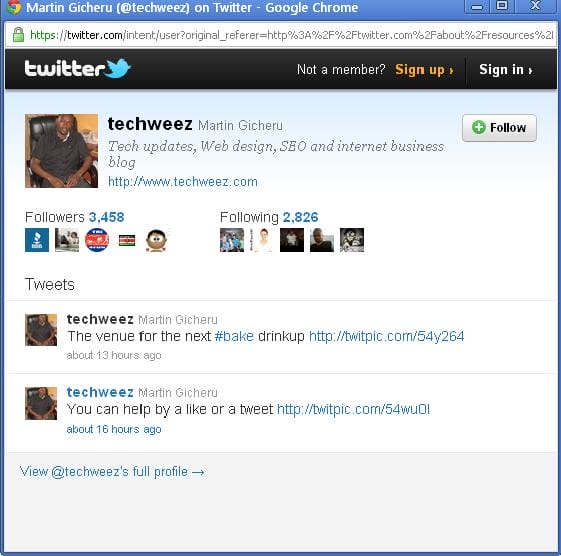
When you click the text username that is next to the button you will be able to see the twitter profile and latest tweets of the twitter account.

The code to use is a script that you will paste where you want your button to appear and here it is.

Follow @yourusername

And you can edit this to a dark colour if you blog black here

twitter followbutton preview

Preview of how you see the twitter account on clicking the username

[UPDATE]: For wordpress.com bloggers you can get an easier process that has even more functionality like text colour edit, button colour plus an option to show a twitter feed above the follow button. This can be done by just a shortcode embedded in a text widget in your sidebar, or just anywhere you like. See more details.

  • You may also like

    1. Picture: Facebook Introduces the Subscribe Button

      Facebook Introduces the Subscribe Button

      You can now access and get updates from your friends who have passed the 5000 facebook limit. And no...

    2. Picture: How to get followers on twitter without any software

      How to get followers on twitter without any softwa...

      Currently there are so many solutions online on how-to’s of twitter. Most of them being how to...

    3. Picture: Twitter introduces friend suggestions

      Twitter introduces friend suggestions

      Twitter has from end of july introduced friend suggestions, to make you able to know and follow more...

    4. Picture: How to increase your safety on twitter

      How to increase your safety on twitter

      We have witnessed an increased number of security breakdowns involving twitter where several people ...